How to Redeem Phonk Slap Codes
The Codes window sits at the top of the HUD. Paste once, wait, then move to the next string.
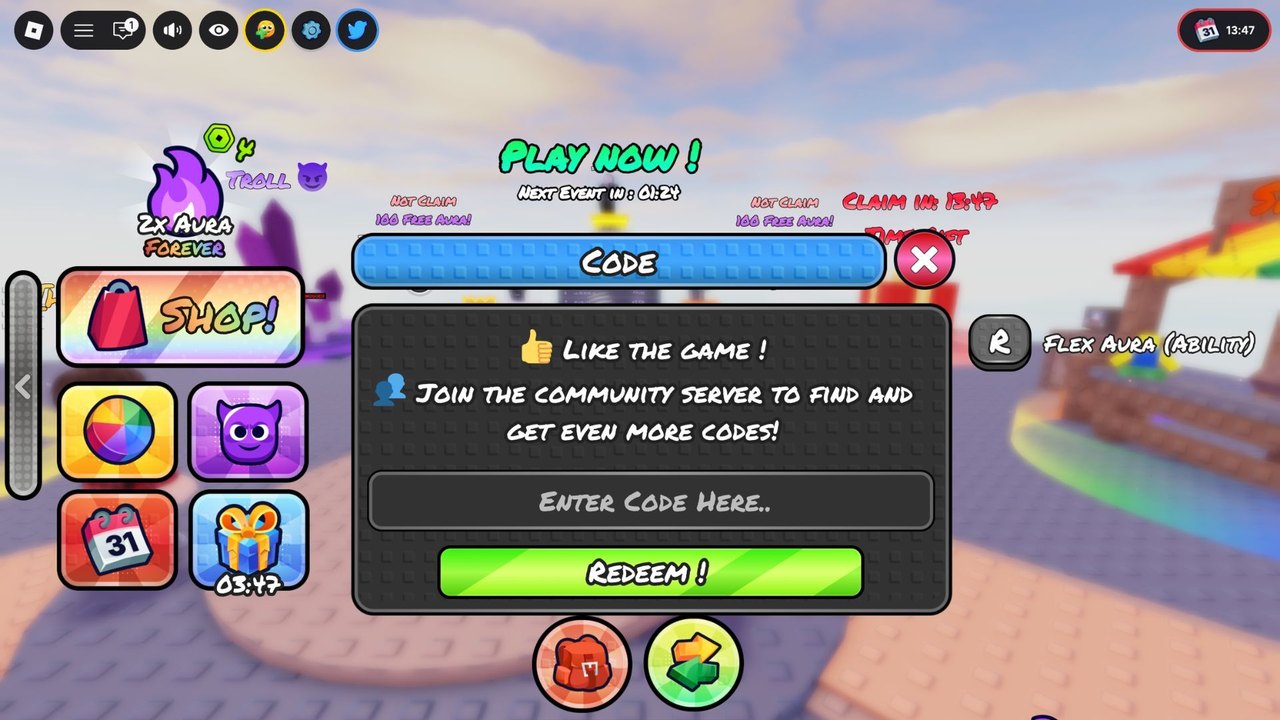
Redeeming Phonk Slap codes is a one-minute job if the arena HUD has finished loading. The Codes window is not buried in Settings. It is a top-bar button that opens a dark panel with an “Enter Code Here..” field and a green Redeem button. The same panel asks you to like the game and join the community server — those are extra-code channels, not requirements for the four strings on the codes hub.
If you skip this page and mash Redeem during the spawn fade, the first paste often vanishes. Wait until you can see the island, the Shop rail, and the Flex Aura prompt. Then follow the steps below in order.
Step-by-step on every device
- Launch Phonk Slap on Roblox and stay in the server until the colorful island, not a black skybox, is on screen.
- Look at the top of the HUD for the Codes control. It sits with the other utility icons, not in the left Shop stack.
- Open the Codes window. You should see the like reminder, the community-server note, the text field, and Redeem ! in green.
- Copy one code from the working list — start with
250KVISITS. - Paste it with no spaces before or after. Do not lowercase it.
- Press Redeem and wait for Aura, spins, or the title to appear. Do not close the window instantly.
- Repeat for
500KVISITS,3KLIKES, andOGPLAYER. - Close the window and check the Shop / inventory so the 250 Aura and four spins are actually there before you spend.
On a phone, the top bar can hide under the Roblox chrome. Swipe the HUD down or rotate to landscape once if you cannot find Codes. On a gamepad, highlight the top icons with the D-pad or right stick, then confirm. The slap bind is R2 and the ability bind is R1; those are not the Codes confirm button.
Why a code fails
Most failures are typos, not expired strings. The public list still has no expired codes, so a rejection is usually one of these:
- Wrong casing.
250kvisitsis not250KVISITS. - Hidden space from a messy copy. Paste into the field, then backspace any gap at the end.
- HUD not ready. Redeeming while the spawn camera is still moving can drop the request.
- Already claimed on that Roblox account. Codes are one-time per account, not per server.
- Wrong game. Slap Battles, SLAP by Current, and Phonk Slap Tower are different experiences. Their codes will not pay Aura here.
If three tries fail with the exact official string, stop. Spamming Redeem will not unstick a claimed code. Check the codes hub for an update and the changelog if the developer rotated the Roblox description.
Codes versus on-screen claims
The HUD also shows event timers: “Next Event in”, “Claim in”, and “100 Free Aura” tiles marked Not Claim. Those are not typed codes. You claim them on the event widgets, not in the Codes box. Pasting 100FREEAURA or CLAIM will fail. Event cadence lives on the events page.
The Shop rail next to Codes lists 2x Aura Forever, TROLL, and gift / calendar tiles. Buying those is unrelated to redemption. Read rewards explained and the Aura planner before you convert the visit-code pile into a multiplier you do not need yet.
After the codes land
Open how to get gloves if the four spins are sitting unused. Open Aura farming if you want the 250 Aura to grow instead of vanish on a trail. If you have not slapped anyone yet, the controls page is the next five minutes of your life: Click / R2 to slap, E / R1 for the glove, and keep your back off the void.
Use the codes checklist when you hop accounts so you do not retype strings you already burned. The checklist is a personal tick list, not a live validator — Roblox will not tell this wiki whether your account already claimed OGPLAYER.
Extra codes later
The Codes window itself tells you to like the game and join the community server for more drops. That matches how the official description currently lists 250KVISITS, 500KVISITS, and 3KLIKES as visit and like milestones. Favorite the experience, like it, and join Falling Towards Success if you want the next wave as soon as it ships. Then come back here instead of trusting a random screenshot in a comment section.
For official links in one place, use the links hub. For the live string list, stay on Codes.
Frequently Asked Questions
Quick answers to the most common Phonk Slap questions.
Where is the Codes button in Phonk Slap?
At the top of the HUD after the arena loads. It opens a panel with an Enter Code Here field and a green Redeem button.
Do I need to join the group to redeem?
The four listed codes work from the Codes window without extra steps. The window still asks you to like the game and join the community server for future drops.
Can I redeem on mobile?
Yes. Open Codes from the top bar, paste one string at a time, and watch for hidden spaces. Landscape mode helps if the Roblox chrome covers the icons.
Why did Redeem do nothing?
Wait for the island to finish loading, paste the exact casing from the codes hub, and confirm you did not already claim that string on this account.