Phonk Slap Codes Checklist
Four strings. Tick them once. The Redeem button is still in Roblox, not here.
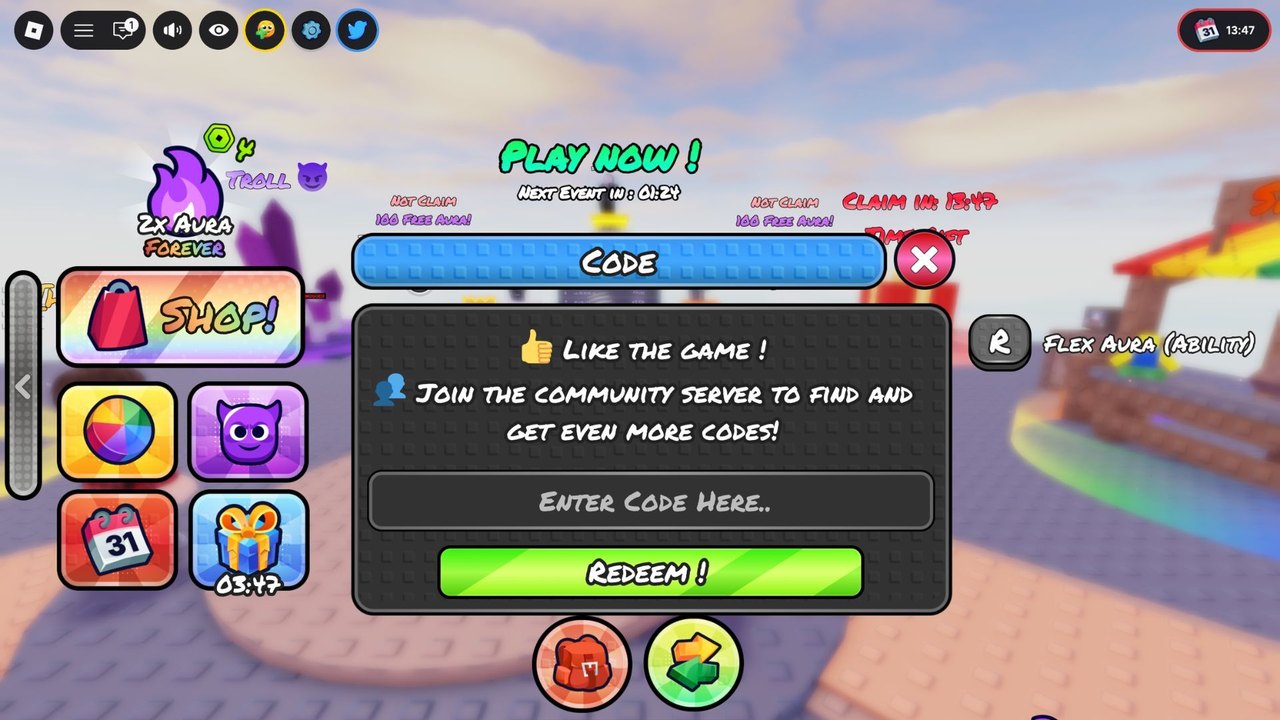
Use this page as a scratch card. It does not talk to Roblox. After you paste a code in the client, mark it here so the next session does not waste a Redeem on a string you already burned. Full steps: how to redeem. Live rewards: codes hub.
Active checklist (August 2026)
Copy one row at a time. Case-sensitive.
-
250KVISITS— 100 Aura. Redeem first. -
500KVISITS— 150 Aura. Redeem second. Combined with the row above = 250 Aura. -
3KLIKES— 4 Spins. Redeem third so you can roll a glove after the Aura is sitting in the account. -
OGPLAYER— [OG] title. Redeem last. Cosmetic only.
Expired: none listed. When a row dies, it moves here with a date instead of disappearing.
After every tick
- Confirm the reward actually landed (Aura number, spin count, title).
- Do not spend yet. Open the Aura planner.
- If Redeem failed, do not tick the box. Fix casing, wait for HUD load, confirm you are in Phonk Slap and not a tower clone.
- If Redeem said you already claimed it, tick the box. The checklist’s job is memory, not hope.
Multi-account note
Each Roblox account has its own four ticks. If you are claiming on a second account, screenshot this list or keep two mental columns. Do not share accounts. Do not use an executor to “batch redeem.” That is a scripts ban dressed as convenience.
When this page changes
A new milestone code will add a row. A dead code will gain an Expired heading. Follow the changelog and the official Roblox description if this page and the client disagree — the client wins, then we catch up.
HUD “100 Free Aura” tiles are not rows. Claim those on events.
Paste hygiene
Copy from this page, not from a comment section screenshot. Comments add spaces, swap 0 and O, and mix in Slap Battles strings. If you must copy from the Roblox description, copy one token at a time — the description currently lists the three milestone codes in a single sentence, which is how people paste 250KVISITS ,500KVISITS with a comma and fail.
On mobile, paste into a notes app first, strip the trailing space, then paste into Enter Code Here. The Roblox field loves trailing spaces. The Redeem button does not.
If you play on two devices, tick here after the second device confirms the Aura number, not after the first device’s button turned green. Replication lag is rare; double-spend confusion is common.
Related
- Rewards explained — what to do with 250 Aura and 4 spins.
- Getting Started — where this checklist sits in the first 15 minutes.
- How to get gloves — where the spins go.
Print the four strings on paper if you are redeeming for a sibling’s account at the same desk. Paper does not auto-correct casing. Chat apps do, and that is how 3KLIKES becomes 3klikes. After both accounts show 250 Aura, close this tab and open how to play before anyone “tests” the glove in the plaza.
If Redeem succeeds with no visible Aura bump, wait five seconds, reopen Shop, then tick. Some HUDs refresh the currency only when Shop or inventory opens. Ticking early is how people re-paste 500KVISITS and think the code died. The code is fine. The HUD was lazy. Then go farm the rim so the 250 is not the last Aura you ever see.
Frequently Asked Questions
Quick answers to the most common Phonk Slap questions.
Does ticking a box redeem the code?
No. Paste the string in the Roblox Codes window, then tick.
How many codes are active?
Four: 250KVISITS, 500KVISITS, 3KLIKES, OGPLAYER. None expired at research time.
Should I tick OGPLAYER if I only care about Aura?
Still redeem it. It costs nothing. Tick it so you do not retry it later.
A friend says a fifth code works.
If it is not on the codes hub or the Roblox description, treat it as unverified.