Phonk Slap Controls
Slap, ability, Shop, Codes — the binds the official page lists and the ones the HUD actually shows.
The official Phonk Slap description is blunt: Click / R2 to slap, E / R1 for ability. That is the whole combat kit. Everything else is movement, camera, and HUD. This page expands those two lines so you stop wasting a glove cooldown on a miss and stop opening Shop when you meant to slap.
If you have not redeemed codes yet, do that first on how to redeem. Controls will not save a completely empty wallet, but they will save a full one.
Combat binds
| Action | PC / laptop | Console | Mobile |
|---|---|---|---|
| Slap | Left click | R2 | Tap the slap control / screen swing |
| Glove ability | E | R1 | On-screen ability button |
| Flex Aura (when shown) | R (HUD prompt) | Check the on-screen R / ability hint | HUD button |
| Move | WASD | Left stick | Thumbstick |
| Camera | Mouse | Right stick | Drag |
Roblox still uses its usual jump (Space / A / on-screen jump) and shift-lock if you enable it in settings. Shift-lock is strongly recommended on PC: slap tracking is a facing problem, and free-camera flicking is how you eat a return slap from someone you already hit.
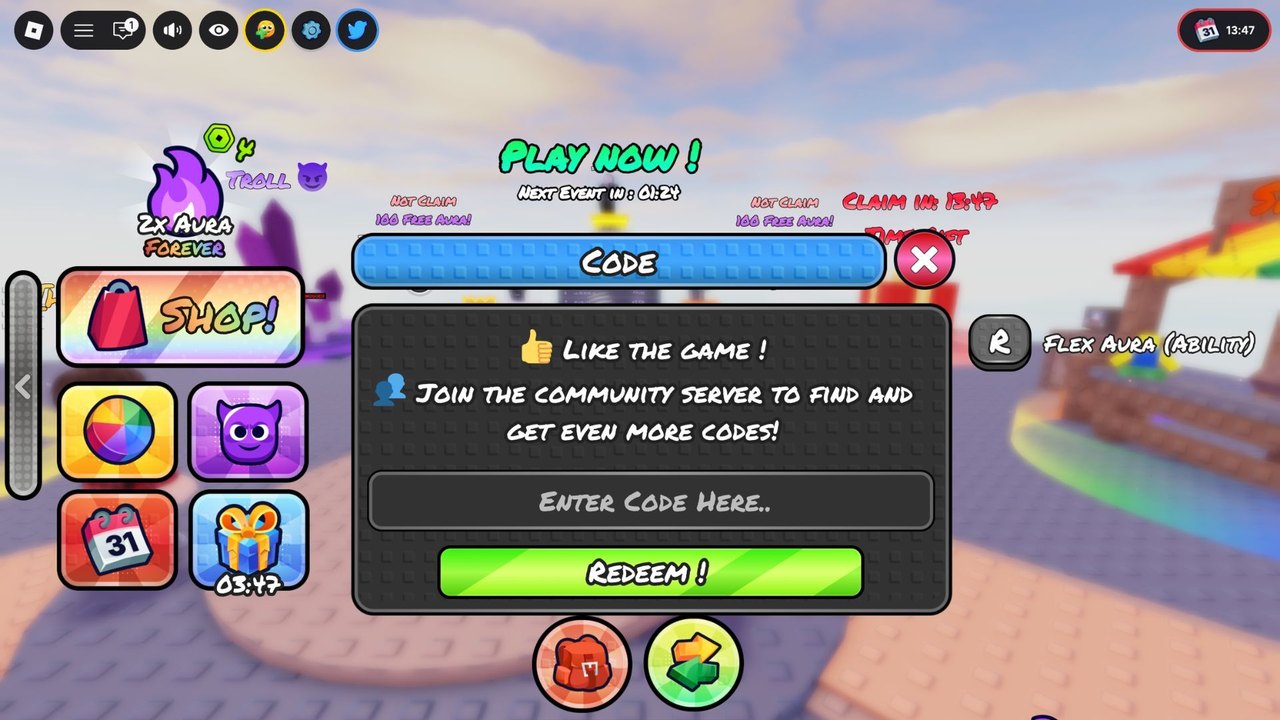
The HUD screenshot of the live client also labels Flex Aura (Ability) with an R prompt. Treat that as a named ability bind on top of the official E / R1 pair. If R does nothing in your session, use E. Do not mash both. Double-input is how you dump a cooldown into the floor.
Slap first, ability second
A slap is your basic knockback. An ability is the glove’s unique power — the official page says every glove has one. New players invert that: they see a crowd, they panic-press E, and they sit in cooldown while someone with a default glove walks them off the dock.
Rule of thumb from how to play:
- If the target is already near an edge, slap.
- If the target is in the middle with friends, ability only when you know what it does. Read abilities after you own a non-default glove.
- If you missed, move. Do not recast into the same empty air.
Console players should rest the right index on R2 and the right middle on R1, the same way a shooter rests on triggers. Swapping those by muscle memory from another Roblox fighter is the most common “my slap is broken” report. It is not broken. You fired the ability.
HUD buttons that are not combat
The left rail is Shop, not a weapon wheel. Tiles you will see:
- SHOP ! — gloves, auras, 2x Aura Forever, TROLL.
- Color / avatar tiles — cosmetics. See cosmetics.
- Calendar / gift — timed claims. See events.
- Top CODE — codes, never a slap bind.
Do not bind mental shortcuts like “left side = punch.” Left side is shopping. Combat is click / trigger.
Mobile specifics
Mobile servers are the same 24-player arenas. Your thumbs are smaller than a mouse. Use:
- A claw or high grip so the slap control is not the same thumb as movement.
- Landscape when the top Codes bar hides under Roblox’s menu chrome.
- Lower graphics if the phonk edit hitch makes you drop inputs. The edit is hype, not damage. A stuttering 60 FPS you cannot aim on is worse than a flat 30 you can.
If the on-screen ability button overlaps jump, drag HUD opacity or button positions in Roblox settings. A mis-tap that jumps instead of slapping is a free knock-off for whoever is behind you.
Practice drill (two minutes)
- Stand still. Slap the air ten times. Feel the swing recovery.
- Press the ability once. Count the cooldown out loud.
- Walk to a dummy fight, slap twice, do not use the ability.
- Only on the third engage, use the ability on purpose.
That drill is enough to enter Aura farming without throwing your Getting Started currency. When a patch remaps binds, it will show on the changelog. Until then, Click / R2 and E / R1 are the law.
Related pages
- How to play — when to slap versus when to walk away.
- Abilities — what E / R1 is supposed to do per glove type.
- Getting Started — session order if you skipped it.
- Scripts safety — macros that auto-slap are ban bait.
Frequently Asked Questions
Quick answers to the most common Phonk Slap questions.
What is the slap button in Phonk Slap?
Left click on PC, R2 on console. Mobile uses the on-screen slap control. Official description: Click / R2 to slap.
What button is the glove ability?
E on PC, R1 on console. Some HUDs also show Flex Aura on R. Use one bind; do not mash both.
Does shift lock help?
Yes on PC. Slap knockback follows facing. Shift-lock keeps the camera honest while you backpedal on an edge.
Why did I use my ability by accident?
You pressed E / R1 or the HUD ability button. The slap bind is Click / R2 only. Reset, wait the cooldown, then slap.